Option: DriveLock pre-boot authentication
Open the Pre-boot authentication settings and first select the DriveLock pre-boot authentication option on the Authentication type tab.
If this option is not available, verify that the DriveLock PBA option is correctly licensed and that you saved and reopened the policy after activating the license option.
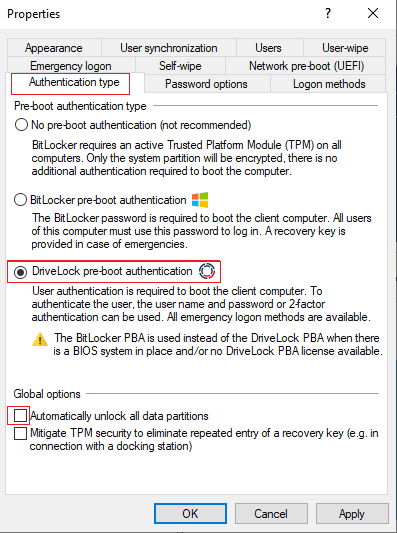
This option is only available for computers running Windows 10 and higher and UEFI firmware. We do not support server systems, older systems or systems with legacy BIOS.
Please note the following:
- If the client computer does not meet the requirements, the BitLocker pre-boot authentication option is automatically used.
- The Automatically unlock all data partitions option has no effect on DriveLock pre-boot authentication because data drives are generally unlocked automatically.
You cannot select any options on the Password options tab. If you want to configure settings on this tab (e.g., for computers where DriveLock pre-boot authentication cannot be used), you must temporarily enable the BitLocker pre-boot authentication option.