Event configuration
Configuration in DOC -> Analysis -> Events -> Configuration -> Event configuration
You can configure the logging and storage location of DriveLock event messages individually for each event. If you configure a remote destination and the computer is not connected to the network, all messages are temporarily stored on the local computer.
In the policy editor of the DriveLock Management Console (DMC), you can open the Events and Alerts node on the left-hand side and then select the DriveLock events sub-node. In this subnode, all events are grouped by the components that create them. When you select a node, a list of available events is displayed in the right part of the window.
To change the settings for a specific event, double-click it to open its properties dialog. On the General tab or in the basic properties in the DOC, you can specify where to send this event to (several destinations are possible) and whether to suppress several events in a short time interval in order to take up less storage space in the log file or log files.
When filtering out event duplicates, individual parameters can now be excluded from the duplicate check. If you want to use this feature, for example, to filter AC events for generated processes, please note that doing so may affect the integrity and functionality of the process tree. We recommend that you exclude specific process starts that are irrelevant to you using event filters instead of modifying the duplicate logic.
Specified targets must be further configured.
On Responses tab, a specific action can be triggered when this event occurs. The action must be described beforehand as a response definition. The Event Info tab shows the event text and parameters in detail. This information is useful when creating event filters.
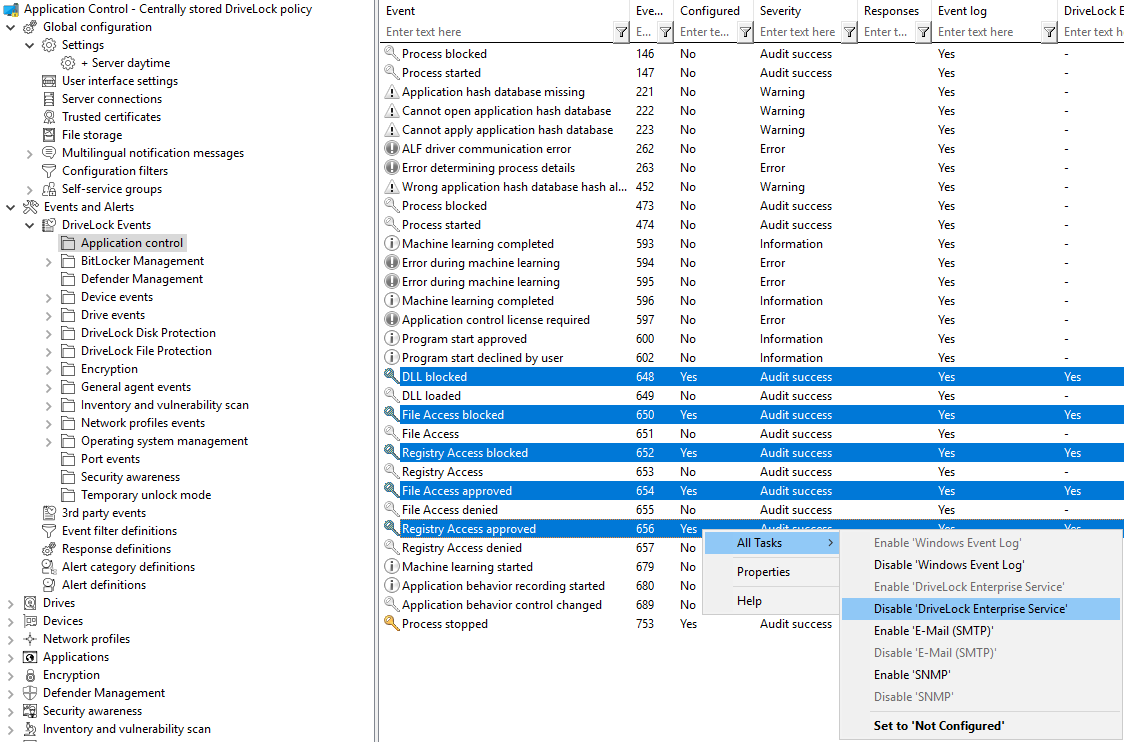
To quickly send multiple events to a destination, select them in the right pane (use Shift and Ctrl to select multiple items) and then right-click the selection. The context menu that opens contains a submenu All Tasks, which contains options to enable or disable each available event target for all selected events.