Deploying DriveLock configuration settings
There are different ways to distribute configuration settings to computers with DriveLock Agents. The configuration steps are the same for all policy types, since the same parameters, whitelist rules, or network settings need to be set.
We recommend working exclusively with centrally stored policies (CSP).
Compared to GPOs, these offer the following important advantages:
-
Some DriveLock functions are only available with CSPs
-
CSPs allow you to edit policies directly in the DriveLock Operations Center (DOC)
-
GPOs require an Active Directory and therefore do not work in Azure AD or Workgroup environments
-
CSPs offer more powerful allocation options
-
GPOs are less secure as they are simply copied from a DFS share, while CSPs are retrieved from the service via HTTPS
-
By using HTTPS, CSPs also work over the Internet
The following configuration matrix helps you to get an overview of which configuration types are possible.
|
|
Central configuration |
Requires DES |
Uses existing infrastructure |
History / Versio- |
Flexibility |
|---|---|---|---|---|---|
|
Centrally stored policy (CSP) |
Yes |
Yes |
No |
Yes |
Very good |
|
Group Policy |
Yes |
No |
Yes (AD) |
No |
Acceptable |
|
Configuration file |
Yes |
No |
Yes (UNC, http, ftp) |
No |
No |
|
Local policy |
No |
No |
No |
No |
No |
Before distributing settings to multiple clients on the network, we recommend that you first test them on one or more test clients.
Configuration settings are managed in the DriveLock Management Console under Policies.
Architecture
The following figure provides an overview of the available deployment methods.
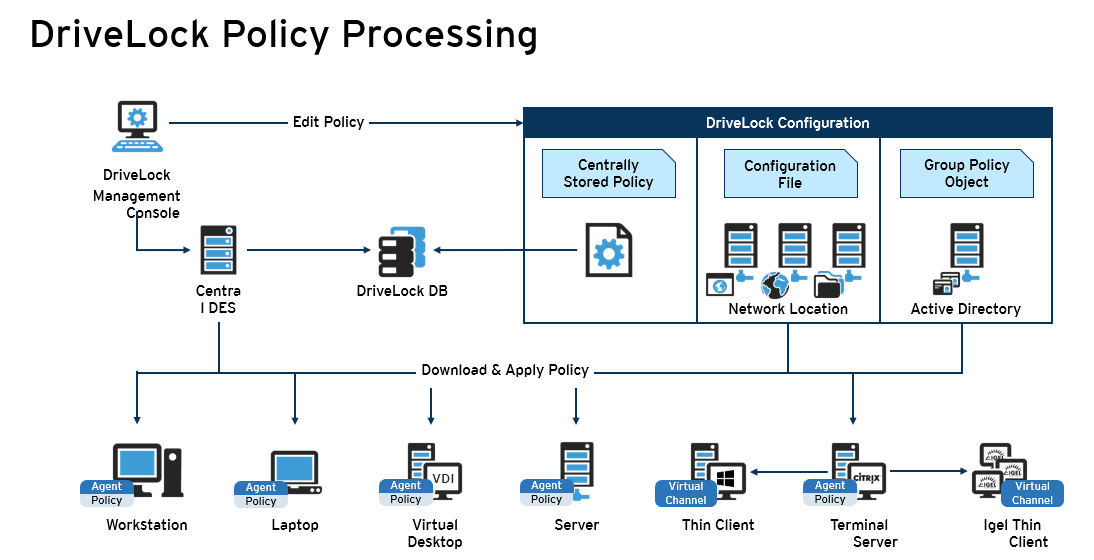
If using Microsoft Group Policy, we recommend that you also use the Group Policy permissions concept to ensure that only authorized administrators can view or modify the DriveLock configuration policy. If you are using configuration files, use Windows file access permissions for this. For centrally stored policies, access control to the DriveLock Enterprise Service provides appropriate security.