Configure MFA based on roles
Users may be required to set up multi-factor authentication (MFA) depending on the roles assigned to them. This requirement applies to both built-in and custom roles.
In this case:
-
MFA must be set up within the configured time period.
-
When logging in for the first time, users are automatically redirected to the regular MFA setup wizard.
Different requirements depending on the login method
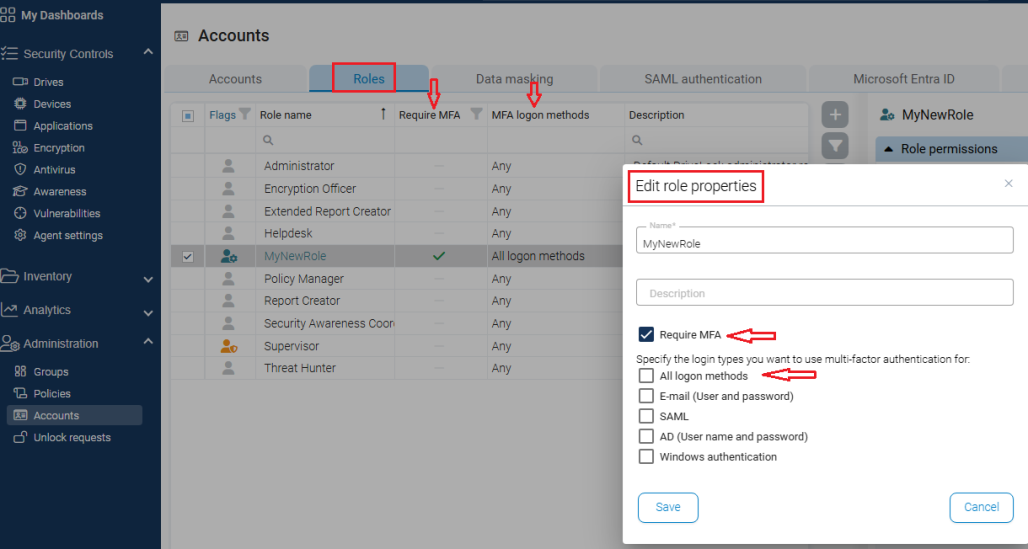
In the role editor, you can specify for which login methods MFA is required.
Depending on the selected login type, an additional MFA requirement may be necessary in the DOC. In many cases, for example when logging in via SAML, no additional MFA is required in the DOC because the identity provider used already performs its own MFA check. The MFA requirement in the DOC needs to be deactivated in these cases.
If a user is assigned multiple roles with MFA requirements, the requirements are added The user can also choose to add additional login methods with MFA. These user settings extend but do not reduce the requirements specified by roles.
Example: A user enables MFA for E-mail. The user also has roles that require MFA for AD (username and password) and Windows authentication. -> MFA is required for all three methods.
Figure: The role view in the DOC shows where MFA is required and which login methods are available: