Encryption protection
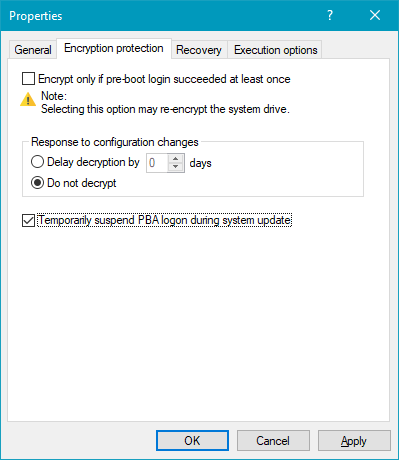
The following options are available on the Encryption protection tab:
-
Encrypt only if pre-boot login succeeded at least once
Enabling this option is a precautionary measure that separates the encryption process from the initial PBA logon. Encryption will be postponed until the first logon has been successfully completed.
-
Response to configuration changes
-
Delay decryption by [x] days:
This setting delays decryption for a certain number of days. This can be useful in order to prepare the client computers and their users for decryption.
A value of 3 days is predefined as the default value. This value offers additional protection against misconfigurations. If you want to perform decryption immediately, change the setting to 0 days.
-
Do not decrypt:
This option is set by default. It ensures that BitLocker encryption is not unintentionally suspended or removed when configuration changes occur; for example, during a DriveLock Agent update, changes in group memberships, or when the policy is no longer applied by the Agent.
Note that decryption is only triggered by deactivating the Encrypt local hard disks on agent computers option described above. As soon as the DriveLock Agent receives a policy with this deactivation setting, decryption will be initiated.
-
-
Temporarily suspend PBA logon during system update: If this option is activated, the BitLocker or DriveLock PBA logon is temporarily suspended during a Windows system update. Once the update is complete, encryption is automatically reactivated. This ensures compatibility and prevents possible conflicts during the update process.