User-related agent settings
By default, DriveLock Agent users are informed about the installation of the DriveLock PBA and their client computer is restarted after 30 seconds after the installation of the DriveLock PBA. You can change these settings if necessary.
Agent settings tab
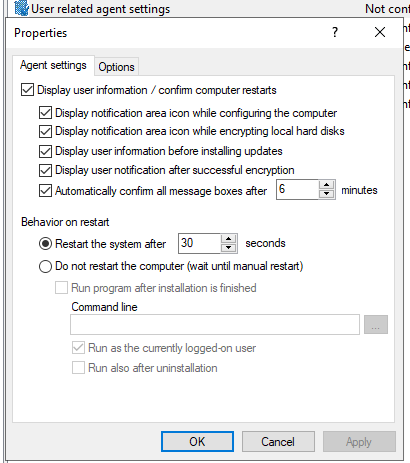
You can choose whether user notifications are displayed and precisely define when they appear in the DriveLock Agent notification area:
-
during configuration,
-
during encryption,
-
before updates are installed, and/or
-
after successful encryption. Administrators can disable the success message to avoid unnecessary notifications for end users.
You can also require that user notifications must be acknowledged within a specified time.
Select the Do not restart computer (wait until manual restart) option if you want to control it yourself. This allows you to start your own installation script, for example, with a shell command after the installation.
Two options are available:
- Run as the currently logged on user: The script runs with the rights of the user who is currently logged on. Normally it would run under the local system account.
- Run also after uninstall: The script runs during installation and uninstallation.
Options tab
Show BitLocker Management logon messages: Select this option if you want the pre-boot authentication information to appear in the notification area of the client computer after logon to Windows.
A message with detailed information then appears on the client computer.