Mobile Encryption on Linux Agents
To use DriveLock Mobile Encryption on Linux clients, you must first run the DriveLock Mobile Encryption Application.
Please proceed as follows:
-
Copy and extract the file DLMobile.tgz to your Linux client, for example to the desktop. This file is available either on the DriveLock ISO image or on the USB stick (provided the Linux Mobile option is enabled in the policy under the Volume settings tab). The extracted folder DLMobile contains the file dlmobile-install.sh.
-
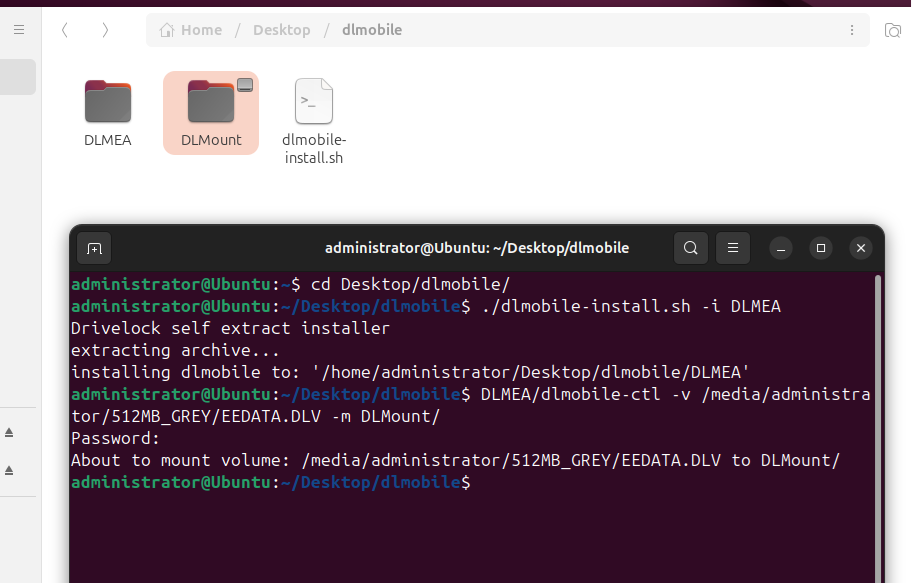
Within the DLMobile folder, create a new folder named DLMount. This will be used as the mount point for the encrypted USB stick.
-
Run the dlmobile-install.sh script with the -i parameter and specify a target folder (in this example, DLMEA):
./dlmobile-install.sh -i DLMEAThis copies the application files to the DLMEA directory.
-
Then run dlmobile-ctl with the following parameters to mount the USB stick to the DLMount directory:
./dlmobile-ctl -v /media/administrator/512MB_GREY/EEDATA.DLV -m DLMount -
Navigate to the DLMount directory to view the contents of the encrypted USB stick.
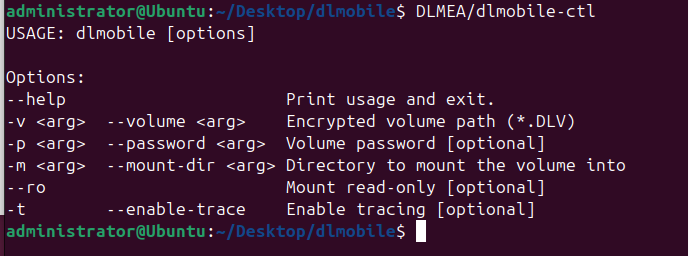
Here is a list of the available command line parameters: