Repackaging the installation package manually
Some MDM systems, such as JamfNow, do not support software distribution with scripts. To enable a fully automated installation with these MDM systems, an MDM administrator must configure the specific (company-internal) settings for the DriveLock Agent within the Package Installer before the software can be distributed via the MDM system.
Preparation:
-
The Xcode command line tools have been installed.
-
The company's Developer ID Installer certificate is installed in the keychain.
Please do the following:
-
Unpack the DriveLock Agent package with the following command:
% pkgutil --expand /path/to/drivelock/agent.pkg /folder/to/extract/to
Please note that the folder into which you want to unzip must not exist beforehand.
-
Open the postinstall file with an editor. For example:
% vi /extracted/folder/DriveLock_Agent.pkg/Scripts/postinstall
You can also open the postinstall file by right-clicking on the DriveLock_Agent.pkg file in the unpacked folder, selecting Show package contents from the context menu, right-clicking on the Scripts/postinstall file and opening it with a suitable application, e.g. Visual Studio Code.
-
Configure the agent settings
Enter DES_URL, DES_TENANT, DES_JOINTOKEN (optional) according to your company's settings and save the file.
-
Package the modified installer.
% pkgutil --flatten /extracted/folder path/of/modified/drivelock/agent.pkg
-
Sign the modified installation package with the Developer ID Installer certificate
% productsign --sign "Developer ID Installer: Your Company (XXXXXXXXXX) "path/of/modified/drivelock/agent.pkg path/of/signed/drivelock/agent.pkg
-
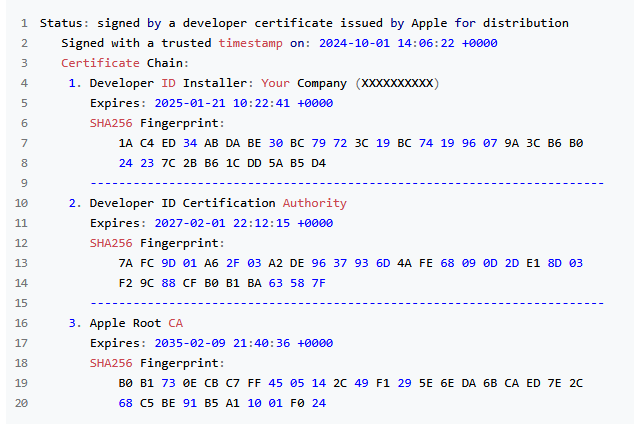
Check the signature of the newly signed installation package
% pkgutil --check-signature path/of/signed/drivelock/agent.pkg
The output should look like this:
-
As soon as the newly created installation package is properly signed, it can be deployed via an MDM system. The administrator can decide whether the newly created installation package should be notarized, but this is not mandatory for further MDM deployment.