DriveLock Management Console (DMC)
The DriveLock Management Console (DMC) is a MMC snap-in and can be used both as a stand-alone console and as an additional component of an existing administrative configuration in a Microsoft Management Console (MMC).
In the DMC, you perform important configuration tasks for DriveLock 'On-Premise'. These are:
-
Create policies,,
-
Assign policies,
-
Configure DriveLock Enterprise Services,
-
Configure DriveLock File Protection and
-
Control the DriveLock Agents in operation.
Once you have installed the DriveLock Management Console, you can start it from the Windows Start menu by selecting All Programs / DriveLock / DriveLock Management Console:
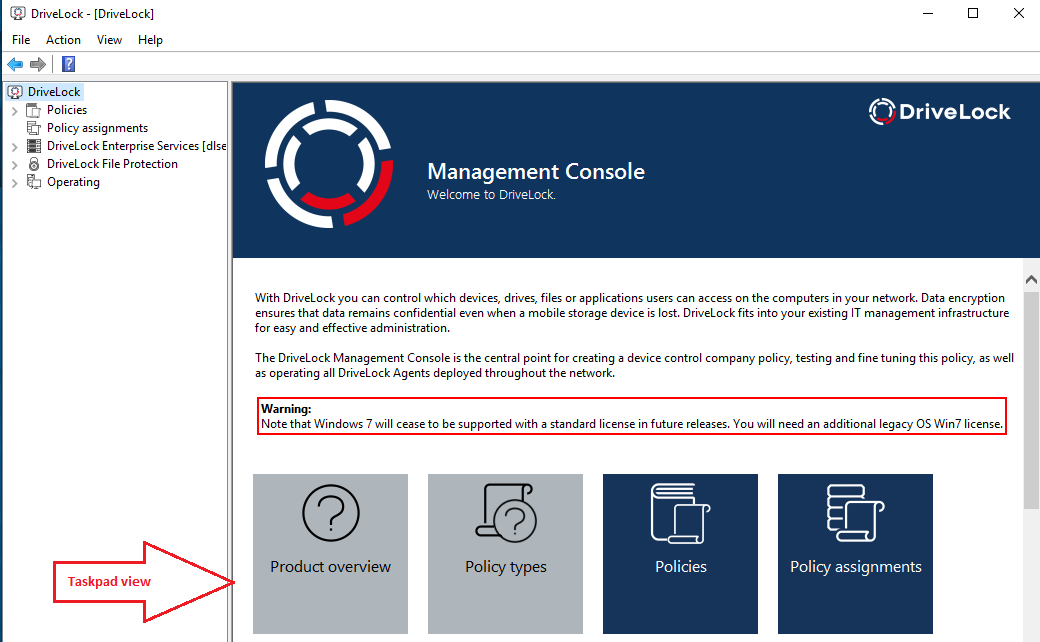
The menu bar at the top contains the standard menu of an MMC, along with the buttons for accessing certain functions.
On the left side of the navigation area you can access the different functions of the DriveLock Management Console. The tree structure contains individual nodes with their sub-functions.
The taskpad view on the right shows the menu items available within a node. You can also switch this view to a detailed view (List view) showing items inside a list. This is largely the same as the classic view of an MMC.
Almost every node in the navigation pane and every element of a detail view has a context menu with corresponding functions, accessed by right-clicking.
In some places of the DriveLock Management Console or in the policy editor, you can switch from the taskpad view to the list view. Select the context menu / View / Taskpad view to switch back.