Recovering disks
Before you can start the recovery, make sure you meet the following requirements:
-
The *.dke file required for the computer was created and copied to a USB flash drive.
-
You have created a bootable Windows PE recovery media.
Now boot the computer from the recovery medium.
Then you will see a command line window with a list of available disks (volumes). To display this list again, use this command: echo lis vol | diskpart
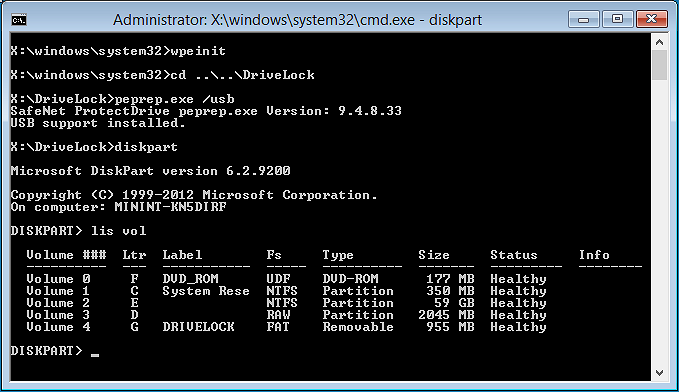
Encrypted volumes are displayed in the Fs column as RAW. Memorize the drive letter of the USB stick that contains the recovery file (if necessary, insert the stick and display the list again).
Enter the command cd X:\DriveLock
Use the following command to introduce the recovery key for decryption to the system:
peprep -inj <USB drive letter>:\<path to disk key file>
The command in this example is peprep -inj G:\PMDLW8X84.DKE Now enter the password that you used to create the DKE file.
Run the command echo lis vol | diskpart again to see if the recovery key was successfully added.
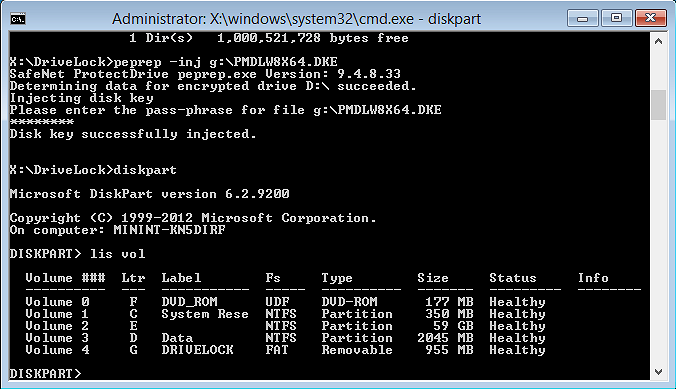
If the action was successful, the drive will no longer be displayed as RAW.
Enter Exit to leave DISKPART.
You can now access the drive (provided there is no other critical issue) and copy important files or try to repair the hard drive.