Defining a new widget
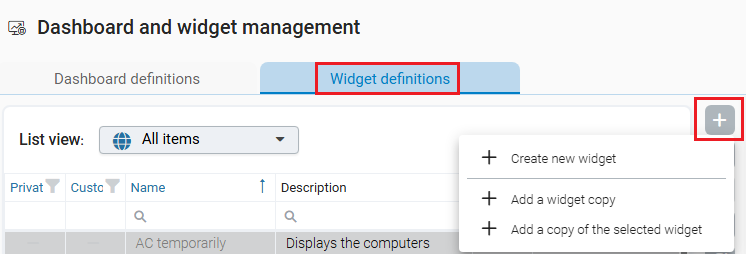
A new widget can be created in the Widget Definitions section using Create new widget.
In the dialog, you define
-
the desired schema
-
the widget type (list, chart, etc.)
-
grouping via properties if necessary
-
Name and description
Widgets can be based on any schema that is made available in the tenant settings.
Copying widgets
Built-in widgets cannot be edited, but they can be copied. Using the Add widget copy command, you create a copy of a widget that can be fully customized. Created widgets can also be copied, for example to use different variants on different dashboards.
Add copy of selected widget
In the example above, the selected widget “AC temporarily” is duplicated via this command and added directly to the list. It can then be configured in the widget preview.
Search and add widgets
The widget selection dialog provides extended search and filter capabilities. A double-click adds a widget immediately in the background without closing the dialog. This makes it easy to add multiple widgets in succession.