Use case for self-service: Application Control
Objective: Simple self-service with the aim of enabling certain users to run applications that are not on the whitelist in emergencies or during maintenance work. Application Control is temporarily disabled here with the help of self-service. The local whitelist is neither changed nor extended.
In the DriveLock Management Console (DMC), proceed as shown below. You can also create this rule in the DOC under Security Controls -> Agent Settings -> Self-Service -> Rules.
Please do the following:
-
Create a new self-service rule. You can find details here .
-
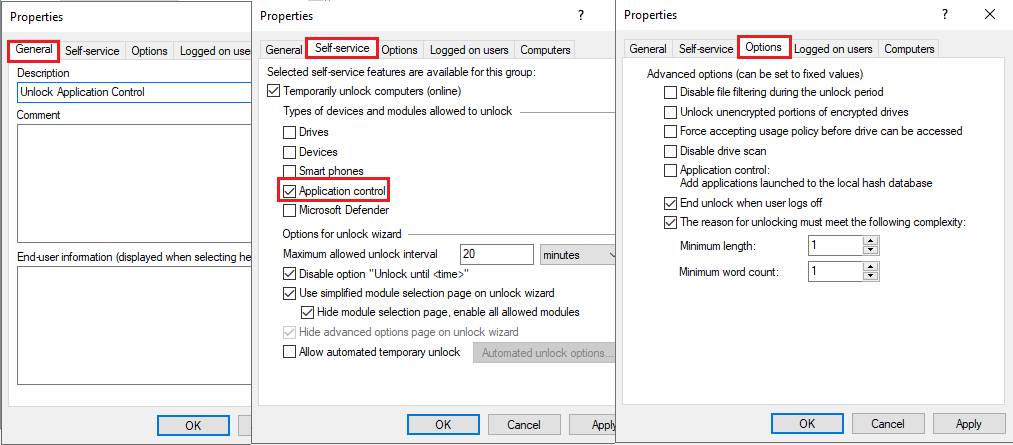
Enter a description on the General tab and set the options on the Self-Service and Options tabs as shown in the illustration:
-
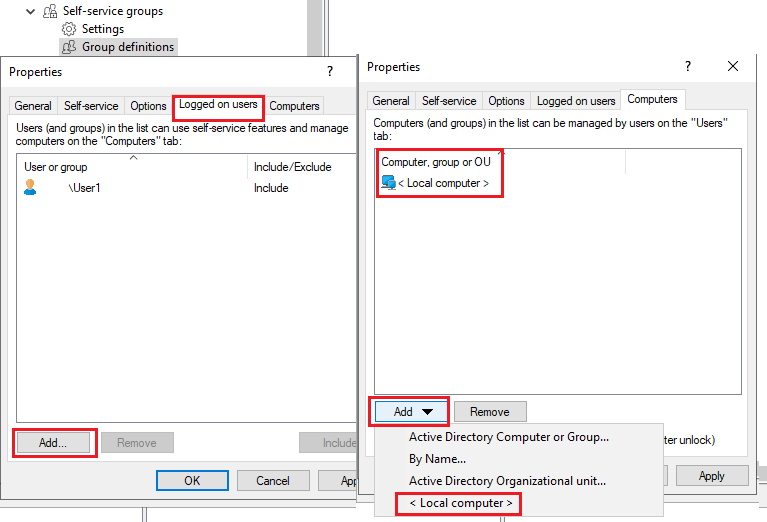
On the Logged in users and Computers tabs, select the users and computers for which you want to enable self-service. Use the Add button for this purpose. See example below:
-
Set the corresponding settings for self-service in the Global configuration, as shown here (under 1. and 2.).
-
Publish and assign the policy.
-
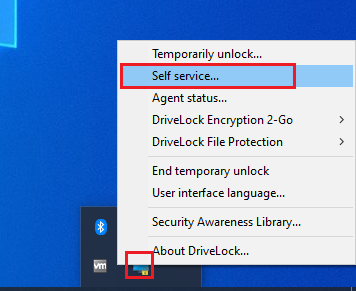
On the DriveLock Agent, the end user can now start the self-service wizard via the icon in the taskbar and then work with the required application in the set time.